
QuickBooks, inside Salesforcesynced both ways
Tally for QuickBooks is a Salesforce app that puts QuickBooks Online invoices, estimates, sales receipts, purchase orders and payments on your Salesforce records. Customers, products and payment status sync between the two, so sales and accounting work from the same numbers.
Rated 5.0 from 21 reviews on Salesforce AppExchange
What you're seeing
- Create Invoice on the Brightline Fleet Expansion opportunity in Salesforce, and invoice 1043 is created in QuickBooks Online.
- Invoice 1043 for $18,400.00 appears in the QuickBooks Online invoice list as Open.
- Dana Whitfield at Brightline Logistics clicks Review and pay and pays it by card.
- The invoice list in Salesforce shows invoice 1043 as Paid, with $0.00 due.
A managed package on Salesforce AppExchange for Professional, Enterprise and Unlimited editions. Works with QuickBooks Online, on opportunities, accounts and your custom objects.
Bill from any recordQuickBooks keeps up
The QuickBooks tab goes on the record your team already works from: an opportunity, an account or your own object. Reps build the invoice from the deal's products and send it, and the balance and payment status stay on the same page.
Pull in the deal's products, then Save and Send. The invoice is created in QuickBooks Online.

An opportunity in Salesforce. The QuickBooks tab lists its invoices.
Invoice from the opportunity
- The Brightline Fleet Expansion opportunity is open on its QuickBooks tab, where invoice 1042 is listed as Paid.
- Create Invoice opens the New Invoice builder, and the rep picks the QuickBooks customer Brightline Logistics.
- Customer email, Net 30 terms, invoice and due dates, and card and bank transfer payments are filled in.
- Fetch Products from Opportunity Line Items adds the deal's 40 dispatch seats and route planning to the lines.
- The rep types a Message on Invoice and clicks Save and Send.
- Invoice 1043 for $18,400.00 is created in QuickBooks Online and listed on the opportunity as Open, due in 30 days.
Estimate to invoice
- Estimate 1007 on the opportunity's Estimates tab is Pending.
- Dana Whitfield accepts it in QuickBooks, and its status in Salesforce changes to Accepted.
- Expand shows the estimate with the line Accepted by Dana Whitfield on Oct 2, 2026.
- Convert to Invoice opens Create invoice, From estimate #1007, with the customer, terms, dates and lines filled in.
- Save creates the invoice in QuickBooks Online, and the estimate is marked Converted.
- Invoice 1043 for $18,400.00 is listed on the Invoices tab as Open.
Paid online, updated in Salesforce
- Invoice 1043 for $18,400.00 is Open on the opportunity in Salesforce.
- Dana Whitfield opens the invoice email from Northbeam Software on her phone and taps Review and pay.
- She pays $18,400.00 with her card ending in 4242, and the phone shows Payment sent.
- QuickBooks Online records the payment on invoice 1043 and sends the change to Salesforce.
- On the opportunity's QuickBooks tab, invoice 1043 shows Paid, a $0.00 balance due and the payment dated Oct 3, 2026.
How the sync worksno exports, no re-typing
Saving in Salesforce writes to QuickBooks Online at that moment. Changes made in QuickBooks come back through QuickBooks webhooks, so a payment, a voided invoice or an edited customer shows up in Salesforce on its own.
After a rep clicks Save and Send
- 1
The invoice is created in QuickBooks Online
With the customer, lines, terms, tax and the online payment options chosen on the form.
- 2
QuickBooks emails it to the customer
Save alone creates it without emailing. Permission sets decide who can do which.
- 3
Salesforce keeps a copy on the record
QBObyTALLY__Invoice__cNumber, due date, balance and a link to open it in QuickBooks.
- 4
Payments update it
Open, Partially Paid or Paid, with each payment listed, whether it was taken in Salesforce or in QuickBooks.
- 5
Voids update it too
An invoice voided in QuickBooks stops counting toward the balance in Salesforce.
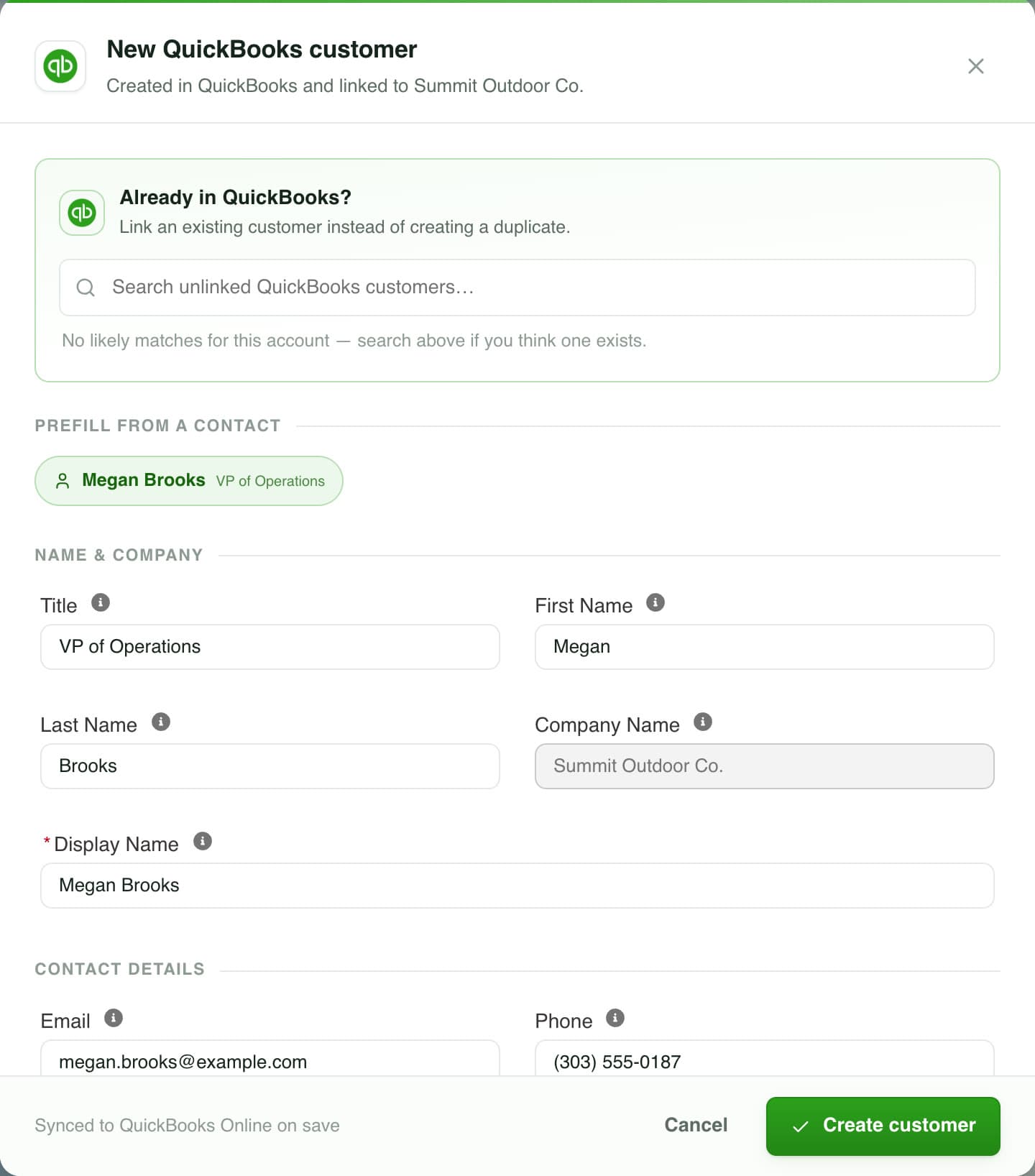
One customer, not two. Link the account to a customer already in QuickBooks, or create one prefilled from a contact.
What stays in sync
- Both ways
Customers
Created or linked from an account. Edits and deactivations in QuickBooks come back.
- Both ways
Products and services
Mapped side by side, or created for you.
- Both ways
Invoices
Edits, payments and voids in QuickBooks come back.
- Both ways
Payments
Taken in Salesforce, or recorded in QuickBooks.
- Both ways
Estimates
Accepted, by whom and when.
- Both ways
Sales receipts
Including voids.
- Both ways
Purchase orders
Including ones raised in QuickBooks.
- Both ways
Vendors
Your whole vendor list. New vendors added in Salesforce are created in QuickBooks.
- From QuickBooks
Classes
For class tracking on lines.
- From QuickBooks
Tax codes and rates
Chosen on each document.
- Both ways
Payment methods
A method you record in Salesforce that QuickBooks doesn't have yet is added there.
- From QuickBooks
Chart of accounts
Income and expense accounts.
Every object and field in the package is listed on the schema page.
The rest of billingfrom the same tab
Everything between the first estimate and the last payment, on the Salesforce records where the deal lives.
Invoices
Create, edit and void invoices, send reminders and generate PDFs from the record.
Recurring invoices
Set the interval once. Each invoice is created on schedule and can be charged to a saved card or bank account.
Estimates
Send estimates, see when they're accepted, and turn them into invoices or purchase orders.
Card and ACH payments
Receive Payment charges a card or bank account through QuickBooks Payments, or records a check.
Sales receipts
Record a sale that's already paid, in one step.
Purchase orders
Order from vendors with item and category lines, ship-to and memo.
Product mapping
QuickBooks items next to Salesforce products, with suggested matches you approve.
Flow actions
Create invoices, estimates, sales receipts, customers and purchase orders from Salesforce Flow.
Class tracking
QuickBooks classes on invoice lines, for reporting by class.
Custom fields
Your QuickBooks custom fields, filled in on the invoice form.
Sales tax
Pick a QuickBooks sales tax rate on each invoice, estimate and receipt.
Historical import
Bring past QuickBooks invoices and customers into Salesforce.
Comparing options? The questions to ask any QuickBooks integration, answered for Tally.
Who works in itand what changes for them
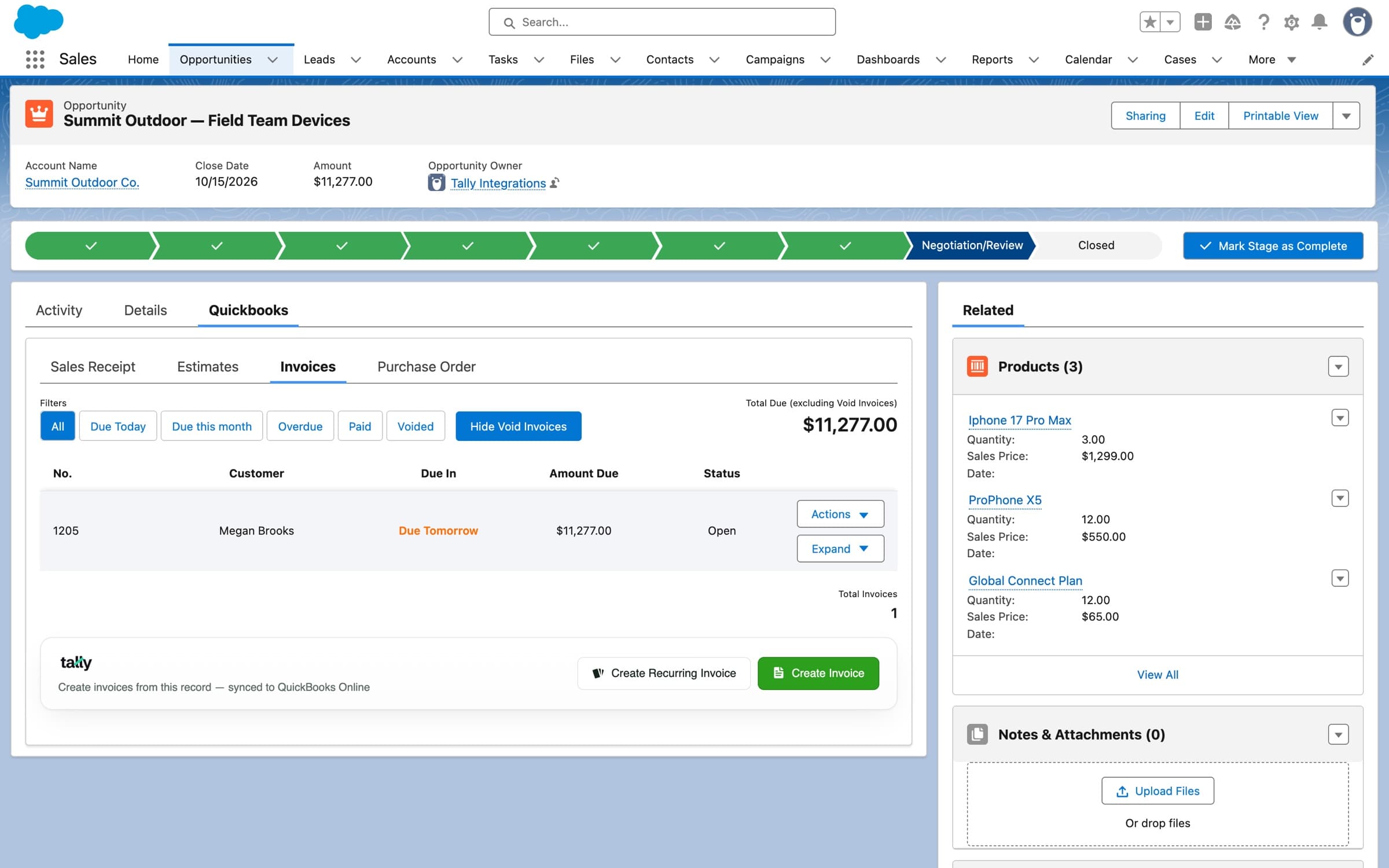
The real QuickBooks tab, on an opportunity in a sandbox org: the invoice list, its filters and total due, and the Tally bar that creates the next one.
Sales reps
Create and send QuickBooks invoices and estimates from the opportunity, the account or any record they work in, and see what's paid, without a QuickBooks login.
Finance and accounting
QuickBooks Online stays the books. Customers, lines, classes and tax arrive there without anyone re-keying a deal.
Salesforce admins
Add the component to any record page, decide who can save and who can send with permission sets, and automate with Flow.
Rated 5.0 on AppExchangefrom 21 reviews
What teams running QuickBooks Online with Salesforce wrote on the Salesforce AppExchange listing.
Excellent and useful application
“Tally lets our sales team send invoices via QuickBooks Online without giving them access that could muddy customer data. It speeds up payment and cash flow, especially on weekends. The team is always updating the tool, and you can always expect a quick, helpful response.”
Absolutely essential if you use Salesforce + QuickBooks Online
“Tally has been a game-changer for our revenue operations. We went live in under a week and it's been rock-solid from day one. No more double entry — the sync is bi-directional, so it's a single source of truth for billing status inside Salesforce. Support has been exceptional.”
Easy! Easy! Easy!
“We had the best experience using Tally to integrate QuickBooks with Salesforce. We were up and running the same day. The UI is excellent and our accountant absolutely loves it — it makes things so easy. Super knowledgeable team and the whole setup was a breeze.”
Pricing
$3,995
a year to start, with Tally Basic. Tally Scale, with every feature, is $7,290.
Three annual plans. Installation is included on Growth and Scale, and Tally Basic has a one-time $1,000 setup.
Plans and add-ons
- Tally Basic$3,995 per year
- Tally Growth$5,899 per year
- Tally Scale$7,290 per year
- Data Migration$1,295 one-time
Growth adds estimates, purchase orders, automation, custom fields, class tracking and custom tax rates. Scale adds payment processing and recurring invoices.