
QuickBooks invoicesfrom any Salesforce record
Create an invoice on an opportunity, an account or your own object. Pick the QuickBooks customer, bring in the products, and save it to QuickBooks Online, or save it and email it to the customer in one step.

The invoice builder on an opportunity's Quickbooks tab, redrawn from the package. Fictional data.
What you're seeing
- Create Invoice on the Brightline Fleet Expansion opportunity's Quickbooks tab opens the New Invoice builder.
- The rep selects the QuickBooks customer Brightline Logistics, Inc. and clicks Use this customer.
- Customer email, Bill to CC, online payments, billing address, Net 30 terms and the invoice and due dates are filled in.
- Fetch Products from Opportunity Line Items adds the opportunity's three products to the lines.
- Save and Send creates invoice 1043 in QuickBooks Online and emails it to the customer.
- View invoice returns to the Invoices list, where invoice 1043 for $20,900.00 is Open and due in 30 days.
Two stepscustomer, then invoice
Create Invoice opens the builder right on the record. It starts from the account, so the invoice goes to the right QuickBooks customer.
- 1
Choose the QuickBooks customer
The QuickBooks customers linked to the record's account are listed. Pick one, link one that isn't linked yet, or create a new one without leaving the builder.
- 2
Fill in the invoice
Email and Bill to CC, billing and shipping addresses, terms with the due date worked out for you, and switches for card and bank transfer payments.
- 3
Add the lines
Search products and services, or fetch the opportunity's line items. Each line has its description, quantity, rate and tax.
- 4
Save, or Save and Send
QBObyTALLY__Invoice__cSave creates it in QuickBooks only. Save and Send also emails the customer. The QuickBooks invoice number shows as soon as it's created.
What goes on the invoiceand where it comes from
Defaults come from Invoice Settings in Salesforce and from your QuickBooks company, so reps mostly check and send.
Terms and due dates
Due on Receipt, or Net 7, 15, 30, 45 or 60. The due date follows the terms and the invoice date.
Card and bank transfer
Turn online card and bank transfer payments on or off per invoice. Above your credit card limit, only bank transfer is offered.
Discount, tax and shipping
A percentage discount before or after tax, a QuickBooks sales tax rate, and shipping when your QuickBooks company uses it.
Messages
A message on the invoice and one on the statement, prefilled from the defaults you set in Invoice Settings.
Attachments
Attach files to the invoice and choose, file by file, which ones go out with the email.
Your invoice numbers
Type the invoice number yourself when custom transaction numbers are turned on in QuickBooks.
After it's createdeverything from the record
Each invoice is listed on the record with its number, due date, balance and status. Expand it to work on it without opening QuickBooks.
From the invoice
Send reminder
QuickBooks emails the invoice to the customer again.
Generate PDF
QuickBooks renders the invoice PDF and you download it from Salesforce.
Edit
Dates, terms, addresses, lines, discount and messages. The changes go to QuickBooks.
Void
Voids it in QuickBooks and in Salesforce.
Receive Payment
Charge a card or bank account, or record a check.
On the record
Filters
All, Due Today, Due this month, Overdue, Paid and Voided.
Total due
What the customer owes on this record, not counting voided invoices.
Payments
Each payment on the invoice, with its date and amount.
View in QuickBooks
A link to the same invoice in QuickBooks Online.
Status that keeps up
Open, Partially Paid, Paid or Void, updated when QuickBooks changes.
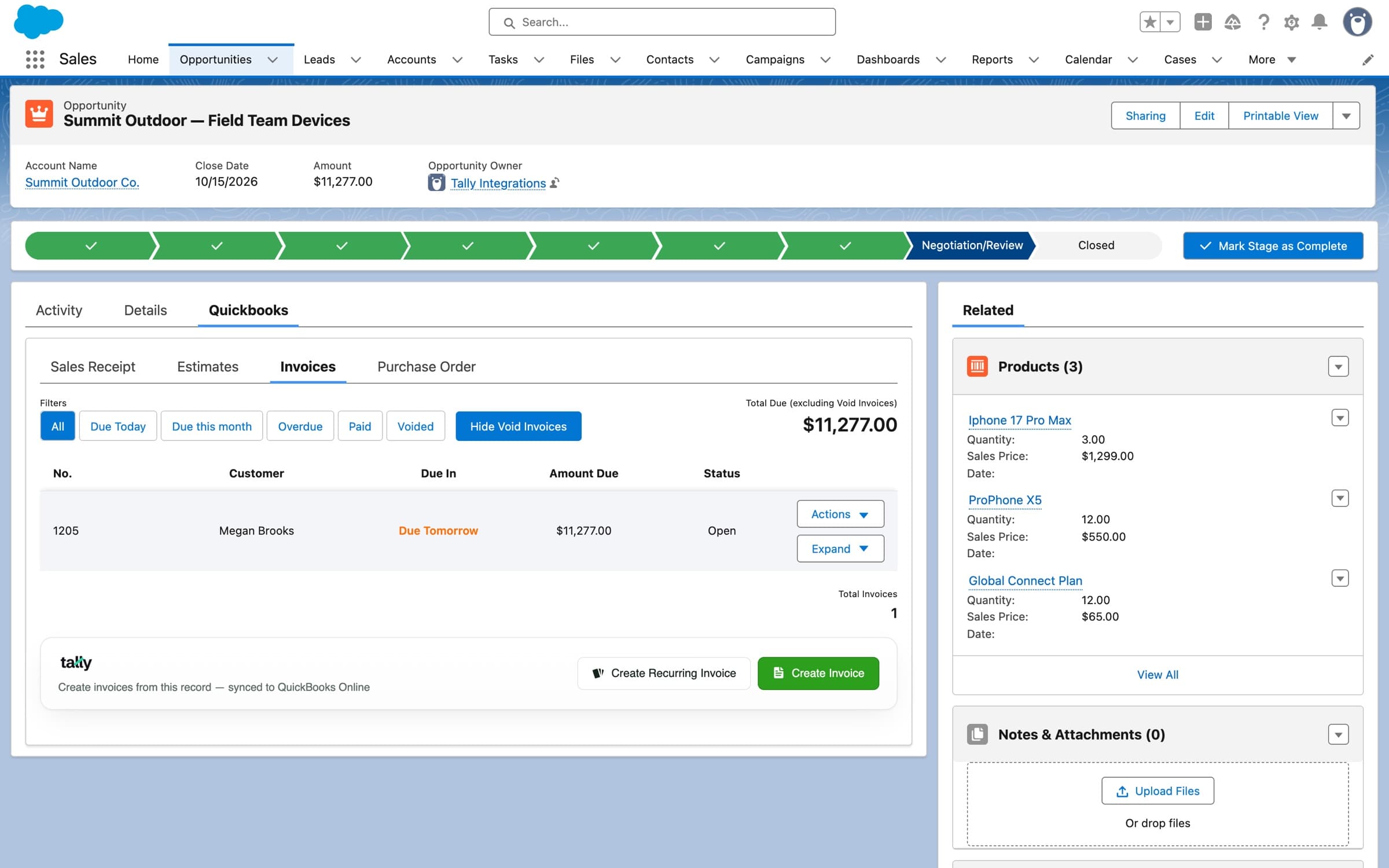
The real component on an opportunity, in a sandbox org with demo data.
Invoices from a Flowwhen the deal closes
The package adds Flow actions for invoices. Given an opportunity or an order, Create Invoice on QBO - Easy Setup fetches its line items itself.
Create Invoice on QBO - Easy SetupCreate Invoice on QBO using SF Invoice recordRecord Payment on Existing QBO Invoice- 1
An opportunity closes
Or an order is activated, or anything else a record-triggered Flow can watch.
- 2
The Flow creates the invoice
Create Invoice on QBO - Easy SetupWith the account's QuickBooks customer, the dates, and the line items fetched from the opportunity or order.
- 3
It's sent, or marked paid
Send Invoice emails it. Mark Invoice as Paid records a payment for the full amount, with the method and check number, when you were paid already.
- 4
Status comes back
Payments made later in QuickBooks update the invoice in Salesforce.
Also on the invoicepayments and schedules
Payment processing
Take card, ACH and check payments on the invoice
Receive Payment charges a saved card or bank account through QuickBooks Payments, or records a payment you've already collected.
Read more →
Recurring invoicing
Bill on a schedule
Save the invoice as a template with a schedule. Each invoice is created on its day, and can be charged to a saved card.
Read more →
Pricing
$3,995
per year, Tally Basic
Invoicing is in every plan. Tally Basic has a one-time $1,000 installation; Tally Growth and Tally Scale install free.
In Tally Basic
- Create, edit, and resend invoices in SalesforceIncluded
- Track invoice status — Overdue, Due, PaidIncluded
- Sync products & services both waysIncluded
- Sync accounts & QuickBooks customersIncluded
- Pre-populate line items from Opportunity productsIncluded
- Download invoice PDFsIncluded
Questionsabout invoicing
Which Salesforce records can I invoice from?
What's the difference between Save and Save and Send?
Where do the invoice lines come from?
Can I change or cancel an invoice after it's created?
Do payments made in QuickBooks show up in Salesforce?
Who can create and send invoices?
More of the package
All features- Recurring Invoicing
- Payment Processing
- Estimates
- Sales Receipts
- Purchase Orders
- Product Sync
- Automation
- Class Tracking
- Custom Fields
- Custom Tax Rates
- Data Migration
Guides on the blog
- How to Set Up a Successful QuickBooks + Salesforce Integration
- How to Map Salesforce Accounts to QuickBooks Customers
- How to Download QuickBooks Invoices as PDFs from Salesforce
- Credit Card Limits for QuickBooks Payments in Salesforce
- The Benefits of Tally's QuickBooks and Salesforce Integration
- 5 Reasons to Integrate QuickBooks and Salesforce