Credit Card Limits for QuickBooks Payments in Salesforce
Set a maximum amount customers can pay by credit card and require ACH above it — control card-processing fees on large invoices with Tally's CC limit feature.
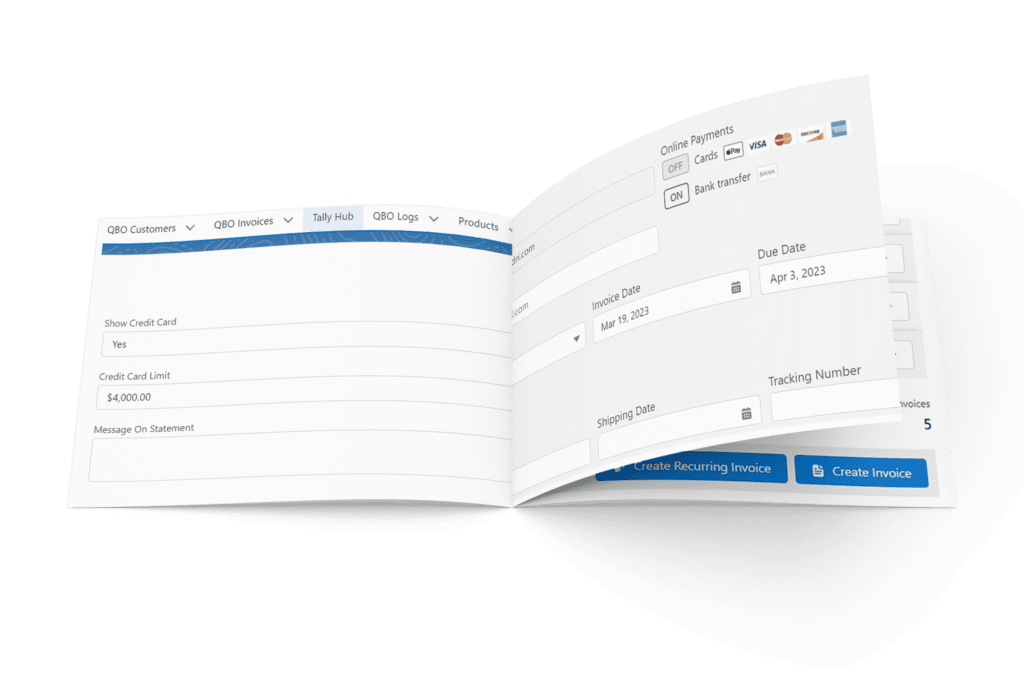
QBO By Tally New Feature. Credit Card Limits
Jamie S February 9, 2023
As a business owner, you understand the importance of managing your finances effectively. Cash flow management is paramount to effective financial management. With Tally’s integration of Salesforce and QuickBooks, you gain full control to manage your own cashflow with our new, Credit Card Limits capability. The CC limit feature allows you to set a “maximum” you’ll allow customers to pay you via credit card. Once you’ve set the limit, Tally automatically does the rest – auto-disabling the ability for customers to pay via Credit Card if the amount in question exceeds that limit. This feature helps businesses to save money on credit card fees, which we all know can add up quickly, eating into your profits. Oftentimes, manually turning off the CC feature is overlooked during the excitement of sending out an invoice. This may result in unexpected CC charges; and, as mentioned, unnecessary charge fees! Tally’s CC limit feature eliminates the need for manual intervention; ensuring that your customers can only pay the amount you specify via CC. This feature can also help you better manage your cash flow by controlling how and when your customers pay. By setting CC limits, you avoid potential cash flow issues, ensuring the business can run smoothly. Contact your sales representative to learn more, or email us at inquiries@gettally.io
Share on
PrevPreviousTally’s Benefit to our Subscribers
NextQuickBooks and Salesforce Mistakes; and How To Avoid ThemNext
POST RELATED